Making Your Resume ATS‑Friendly: A Practical Guide
ATS parsing
Structure beats design
An ATS doesn't judge layout. It extracts data. Make that extraction easy and your resume passes screening.
Your resume looks good to you. But if an Applicant Tracking System can't read it correctly, it won't reach a human — no matter how strong your background.
This guide covers the specific formatting choices that make your resume readable to both ATS parsers and hiring managers. It's not about design compromises. The formatting that works for machines is the same formatting that humans find clearest.
Skip these rules and your resume disappears into the digital void. Follow them and you pass screening on structure alone.
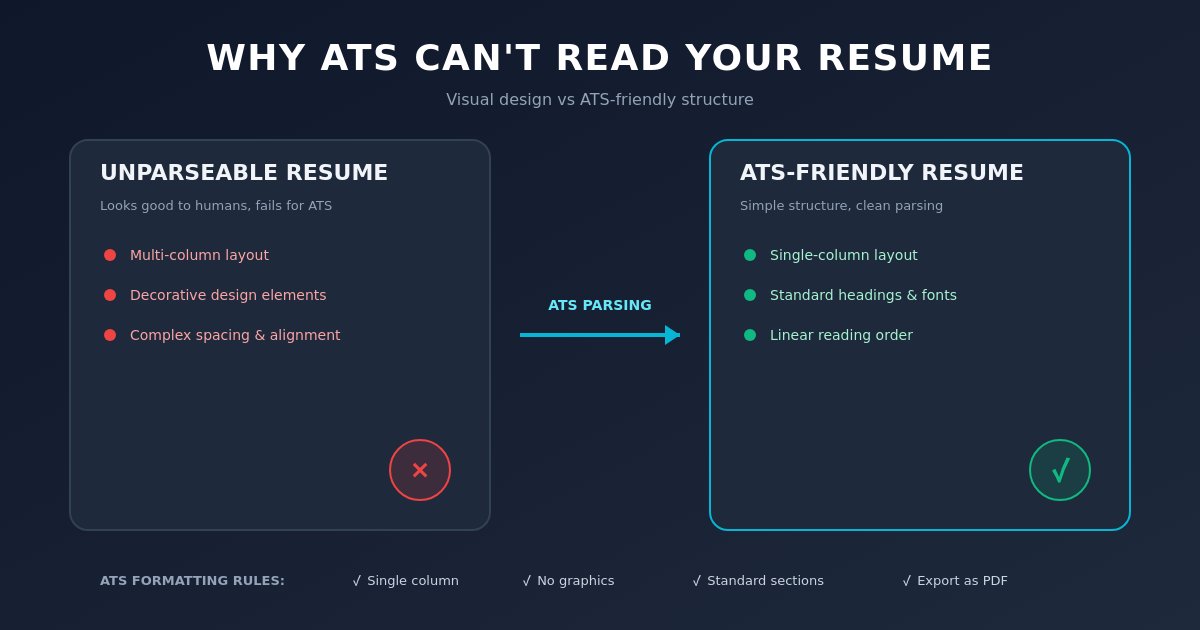
ATS parsers succeed with simple, linear structure. Avoid columns, images, and decorative elements.
Why ATS-friendly actually matters
You write your resume for humans. But it has to survive the ATS first.
An Applicant Tracking System does two things: it reads your resume into a database, then it searches that database against job requirements. If the first step fails — if the system can't correctly extract your job titles, dates, or company names — the search is already rigged against you.
This isn't about cramming keywords or tricking a machine. It's about formatting for readability. The same formatting rules that make a resume readable to an ATS make it readable to a person.
The specific ATS failures you're risking
Most resume rejections aren't "you're not qualified." They're parsing failures:
Multi-column layouts confuse the read order. A parser reads top-to-bottom, left-to-right. If your skills column is on the right and your experience on the left, the system might parse skills before experience — jumbling the context of your background.
Text in images is invisible to ATS. A beautiful resume with your name or key skills in a header image? The system can't see it. You look like you have no name.
Graphics and boxes can distort spacing. Decorative lines, boxes, or colored backgrounds might push text out of alignment when parsed, breaking sentence structure.
Two-page spreads formatted as a single landscape sheet: some ATS systems fail on non-standard page sizes.
Inconsistent dates — "Jan 2020 to Present" in one role, "2020–ongoing" in another — make it harder for automated systems to extract timelines correctly.
The format checklist
Run through this before you export as PDF:
-
Single column layout. All text flows top-to-bottom, left-to-right. No sidebars, no right columns for skills.
-
Standard headings. Use "Experience", "Education", "Skills", "Projects" (not "My Experience" or "Technical Proficiencies").
-
Consistent dates. Pick one format and stick with it: "2020–2023" or "Jan 2020 – Mar 2023". Same format everywhere.
-
Plain text only. No images, no decorative elements, no colored boxes. Text on white or light background.
-
Standard fonts. Arial, Calibri, Helvetica, Times New Roman, or system fonts. Avoid unusual or display fonts.
-
PDF export, not Word. PDF preserves formatting. Word can reflow unpredictably when opened on different systems.
-
No headers or footers. Never put your name, phone, or contact info in the header or footer. Always in the body.
-
Selectable text. Open the PDF and try to select and copy a line of text. If you can't, it's a scanned or image-based PDF and most ATS systems will reject it.
-
No tables or complex formatting. Simple bullets work best.
-
Contact info in plain text. Email and phone at the top. No icons, no LinkedIn QR codes, no links (some systems can't parse them).
Real difference: before and after
Before (what fails)
JOHN SMITH                                     [email protected] | (555) 123-4567
San Francisco, CA
━━━━━━━━━━━━━━━━━━━━━━━━━━━━━━━━━━━━━━━━━━

PROFESSIONAL EXPERIENCE                        [SKILLS SIDEBAR: React, Python, AWS...]

Senior Developer | TechCorp                    Jun 2021 – Present
Improved system performance & led team initiatives. Familiar with React, Python, AWS.

[continues in complex layout...]
After (what works)
JOHN SMITH
[email protected] | (555) 123-4567 | San Francisco, CA

EXPERIENCE

Senior Developer
TechCorp | Jun 2021 – Present
• Reduced API response time by 40% by optimizing database queries and implementing caching
• Led team of 3 junior developers through full system redesign, delivering on schedule
• Built internal tools in Python and React, still in use by 50+ team members

Software Engineer
StartupXYZ | Jan 2019 – May 2021
• Owned frontend architecture for customer-facing platform, scaling to 10k+ daily users
• Implemented real-time notifications system using WebSockets, reducing support tickets by 25%
• Mentored 2 interns through development lifecycle

EDUCATION

B.S. Computer Science
State University | 2019

SKILLS

Languages: Python, JavaScript, Go
Frontend: React, Vue, HTML5, CSS3
Backend: Node.js, Django, PostgreSQL
Tools: AWS, Docker, Git, Jenkins
The difference is structure, not content. The second version is readable by both humans and machines.
Testing your resume with an ATS
Before you apply anywhere, test your resume against a real ATS parser:
- Export your resume as PDF.
- Use our ATS Checker or another ATS parser.
- Look at what the system extracted: Did it get your name right? Your job titles? Dates? Company names?
- If anything is wrong, look at the formatting. Dates off? Maybe they're inconsistent. Company names merged? Maybe the alignment is bad.
- Adjust, export, and test again.
You'll learn quickly what works. Most people find that a simple, linear layout parses perfectly on the first try.
When design and ATS conflict
You want your resume to look good. ATS compatibility can feel like it conflicts with good design.
It doesn't, actually. Clean design and ATS-friendly design are the same thing: single column, good whitespace, clear hierarchy, readable fonts.
If you're using a template, choose one built for ATS compatibility. Most modern resume builders (including our templates) structure resumes for both human readers and machine parsing by default.
The "design vs. ATS" conflict only exists if you're trying to force complex layouts. Once you abandon that, design becomes easier: focus on hierarchy, whitespace, and typography. Those all work in single-column layouts.
The actual stakes
Your resume content might be excellent. Your ATS-unfriendly formatting might invisibly block you from reaching hiring managers who would have called you.
The fix takes an hour. Test it with an ATS parser. Make two or three formatting adjustments. Problem solved.
For the opposite problem — the content is weak — see how to beat ATS systems.
Also: once your formatting is clean, learn how to tailor your resume in 10 minutes to match specific job postings. ATS-friendly structure + tailored content = maximum impact.
Want a resume that reads like this article?
Open the builder and polish your resume with a live A4 preview.