Junior Resume Mistakes That Scream 'Inexperienced' (And How to Fix Them)
Junior credibility cost
'Familiar with' = theory signal
The language you use reveals your experience level. 'Familiar with' tells recruiters you studied it. 'Built with' tells them you shipped with it.
Why junior resumes get filtered
Your resume gets 6-8 seconds of attention. For junior candidates, that scan includes a specific question: Does this person know what professional work looks like?
Experienced candidates make mistakes that hurt their chances. Junior candidates make mistakes that reveal they've never worked professionally — and those mistakes are instant disqualifiers.
This isn't about having limited experience. It's about showing you understand how work gets presented in professional contexts. These mistakes signal you don't yet know the difference.
Language mistakes that reveal inexperience
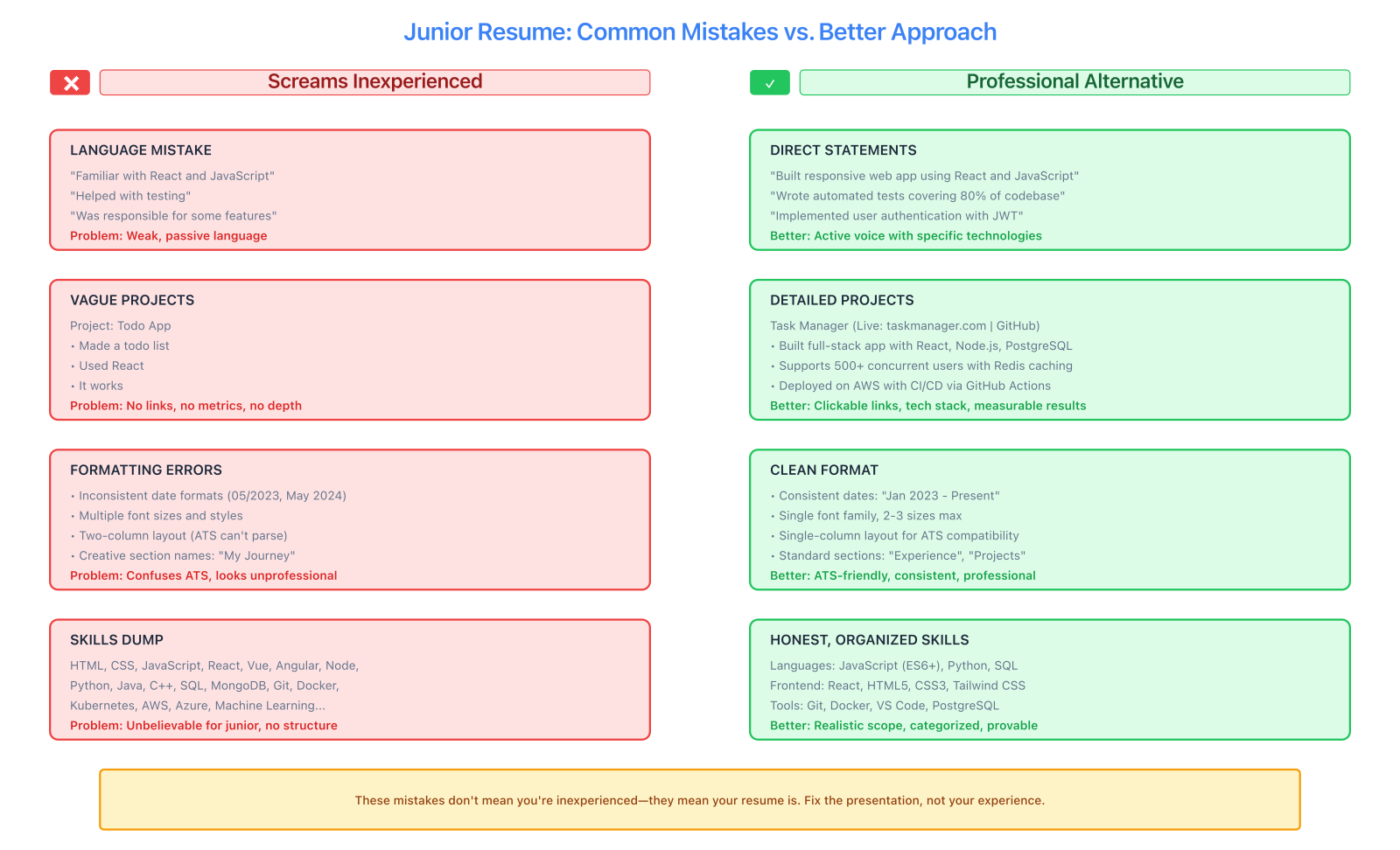
The difference between inexperienced and unprofessional: weak language, missing details, inconsistent formatting, and unrealistic skill claims all signal poor presentation, not poor ability.
"Familiar with" and "Exposure to"
Stop hedging. Either you can use React or you can't. "Familiar with React" tells recruiters you probably can't.
Bad: Skills: Familiar with React, exposure to Node.js, knowledge of SQL
Good: Technical Skills: React, Node.js, SQL
If you list it, you're claiming you can use it. The qualifier doesn't protect you — it just makes you look uncertain. Only list technologies you could actually use at a job today.
"Helped with" and "Assisted in"
Passive language makes your contributions invisible.
❌ Wrong:
• Helped develop features for web application
• Assisted in database design decisions
✅ Right:
• Developed user authentication feature with JWT and bcrypt
• Designed PostgreSQL schema with 6 normalized tables
"Helped" suggests you watched someone else do the work. Even if you collaborated, focus on your specific contributions.
"Responsible for" without outcomes
Listing responsibilities without results is the most common junior mistake.
❌ Wrong:
• Responsible for writing code for the frontend
• In charge of testing features
✅ Right:
• Built responsive React interface supporting 5 user workflows
• Wrote 47 Jest unit tests achieving 92% code coverage
Junior candidates often think their job is to do activities. Professional work is measured by outcomes and impact.
First-person language on resumes
Never use "I," "me," "my" on your resume.
❌ Wrong:
• I built a full-stack application using React and Node.js
• My role was to implement the payment system
✅ Right:
• Built full-stack application using React and Node.js
• Implemented Stripe payment integration with webhook validation
Resumes use implied first-person. Starting with "I" signals you don't understand resume conventions.
Formatting mistakes that signal amateur
Unprofessional email addresses
[email protected] is not going to get you hired. Neither is [email protected] or [email protected].
Use [email protected] or something similar. If your current email makes you cringe, create a new one. It takes two minutes and saves you from looking like you're still in high school.
Resume file names
Don't send "resume.pdf" or "final_final_v3.pdf"
❌ Wrong:
- resume.pdf
- CV_updated.pdf
- Document1.pdf
✅ Right:
- John_Smith_Resume.pdf
- Jane_Doe_Software_Engineer_Resume.pdf
File naming is a professional basic. Getting it wrong makes you look careless.
Weird fonts and colors
Junior candidates sometimes think creative fonts make them stand out.
❌ Wrong:
- Comic Sans, Papyrus, or decorative fonts
- Neon colors or rainbow headers
- Multiple font styles mixed together
- Text in all caps or all lowercase
✅ Right:
- Professional fonts: Inter, Roboto, Arial, Calibri
- Minimal accent colors (one primary color max)
- Consistent hierarchy throughout
- Standard title case for headings
Design doesn't mean decoration. Professional resumes use clean typography and subtle visual hierarchy — not artistic flair.
Our template library includes properly designed options. The Minimal template is the safest choice for junior candidates — it focuses attention on content, not design.
Inconsistent formatting
Nothing says "careless" like inconsistent date formats or bullet styles.
❌ Wrong:
Project 1 | Dec 2025
Project 2 | 12/2024
Project 3 | October - November 2025
✅ Right:
Project 1 | December 2025
Project 2 | December 2024
Project 3 | October - November 2025
Pick one format and stick with it. Same for bullet points, spacing, and indentation. Inconsistency looks sloppy.
Content mistakes that hurt junior candidates
Listing every class project
Don't include every assignment from every class.
❌ Wrong:
Projects:
- Built calculator in Java (CS 101)
- Created to-do list in JavaScript (Web Dev)
- Made rock-paper-scissors game in Python (Intro Programming)
- Wrote sorting algorithms in C++ (Data Structures)
This reads like a coursework transcript, not a professional portfolio.
✅ Right:
Pick your 2-3 most substantial projects — the ones that show real complexity, deployment, or technical depth. Quality over quantity.
Including high school achievements
Once you're in college or working, high school doesn't belong on your resume.
❌ Wrong:
Education:
Bachelor of Science, Computer Science
University of California, Davis | 2022-2026

High School Diploma
Lincoln High School | 2018-2022
• National Honor Society
• Varsity Soccer Team Captain
Unless you're in your first semester of college, leave high school off completely.
✅ Right:
Education:
Bachelor of Science in Computer Science
University of California, Davis
Expected May 2026 | GPA: 3.7
Generic objective statements
Starting your resume with career goals adds nothing.
❌ Wrong:
Objective: Seeking an entry-level position where I can utilize my skills and grow as a professional in a dynamic team environment.
Every entry-level candidate wants to grow. This wastes prime real estate.
✅ Right:
Skip the objective entirely. Lead with Education or a brief technical summary:
Computer science student with experience building full-stack applications using React and Node.js. Strong foundation in data structures, algorithms, and database design.
Even better: skip the summary and let your projects speak.
Inflating project complexity
Don't describe class assignments as "enterprise systems."
❌ Wrong:
• Engineered enterprise-grade financial management platform serving millions of users with advanced machine learning algorithms
When the recruiter clicks your GitHub link and sees a command-line budget calculator, you've lost all credibility.
✅ Right:
• Built command-line budget tracker in Python with SQLite database; supports transaction categorization and monthly expense reports
Be honest about scope. Precision builds credibility. Exaggeration destroys it.
Listing soft skills without proof
Don't waste space on empty soft skill claims.
❌ Wrong:
Skills:
• Strong communication skills
• Team player
• Quick learner
• Problem solver
• Detail-oriented
Everyone claims these. No one believes them without evidence.
✅ Right:
Show soft skills through project descriptions:
• Collaborated in 4-person Agile team using daily standups and sprint retrospectives (teamwork, communication)
• Debugged complex authentication bug by tracing 200+ lines of middleware code (problem-solving, attention to detail)
Demonstrate, don't declare.
Technical mistakes junior developers make
Listing every technology touched
Don't list 30 technologies you used once.
❌ Wrong:
Skills: HTML, CSS, JavaScript, React, Vue, Angular, Svelte, Node.js, Express, Koa, Python, Django, Flask, Ruby, Rails, Java, Spring, C++, C#, PHP, Laravel, SQL, PostgreSQL, MySQL, MongoDB, Redis, GraphQL, REST, Docker, Kubernetes, AWS, Azure, GCP, Git, GitHub, GitLab...
This signals "I'm still learning everything" instead of "I can deliver with these tools."
✅ Right:
Group by category and focus on depth:
Languages: JavaScript (ES6+), Python, SQL
Frontend: React, HTML5, CSS3
Backend: Node.js, Express, REST APIs
Databases: PostgreSQL, MongoDB
Tools: Git, Docker, AWS
List 8-12 technologies maximum. Choose tools you've used in complete projects, not just tutorials.
Not linking to live projects
If you claim you built something, prove it.
❌ Wrong:
Weather App
Built weather application with React
✅ Right:
Weather App | Live: weather-app.vercel.app
Built responsive weather application with React and OpenWeatherMap API
GitHub: github.com/username/weather-app
Dead links are worse than no links, so make sure your projects actually work before listing URLs.
Using "Created website" for every project
Vary your action verbs to show different types of work.
❌ Wrong:
• Created website for e-commerce
• Created website for blog
• Created website for portfolio
✅ Right:
• Developed e-commerce platform with cart and Stripe checkout
• Built content management system with Markdown support
• Designed portfolio site with custom animations and dark mode
Use specific verbs: Built, Developed, Engineered, Designed, Implemented, Deployed, Architected, Optimized.
No version control evidence
If you're applying for technical roles but your resume doesn't mention Git or GitHub, you're missing a fundamental signal.
✅ Right:
Every technical project should reference version control:
• Managed project using Git with feature branch workflow
• Collaborated via GitHub pull requests with code review
GitHub: github.com/username
ATS mistakes that filter juniors out
Using images and graphics in resumes
ATS systems can't parse images, icons, or graphics.
❌ Wrong:
- Skill bars or percentage graphics
- Icon bullet points
- Charts or graphs
- Images of yourself embedded in the resume
✅ Right:
- Plain text bullets
- Standard section headers
- Clean, parseable formatting
Run your resume through our ATS Checker to see exactly how it parses. If sections are missing or garbled, your resume is getting filtered out before humans see it.
Non-standard section headers
ATS systems look for standard headers like "Experience," "Education," "Skills."
❌ Wrong:
- "My Journey"
- "Things I've Built"
- "What I Know"
- "Technical Toolbox"
✅ Right:
- Projects
- Experience
- Education
- Technical Skills
You can be creative in content. Don't be creative with structure.
Saving as .docx or .pages
Many ATS systems parse PDFs better than Word documents.
✅ Right:
- Save as PDF with text (not images)
- Use filename: Firstname_Lastname_Resume.pdf
- Test the PDF opens correctly on different devices
Our resume builder exports clean, ATS-friendly PDFs automatically.
Reference mistakes junior candidates make
"References available upon request"
This was standard in 1995. In 2026, it's assumed.
❌ Wrong:
References available upon request
✅ Right:
Just omit this line entirely. Use the space for a project or skill.
Listing references on your resume
Don't include reference names, phone numbers, or emails on your resume.
❌ Wrong:
References:
Professor John Smith | [email protected] | 555-123-4567
Jane Doe, Manager | [email protected] | 555-987-6543
✅ Right:
Prepare a separate references document. Only send it when explicitly requested.
Common fixes for junior resumes
If you have too many projects listed
Keep only your 3 strongest projects. More isn't better if it dilutes quality.
If you have too few skills
Don't list skills you don't have yet. Instead, build another project using new technologies, then list those skills legitimately.
If your experience section is empty
Use Projects as your primary section. Employment history isn't required for first-job resumes.
If you're worried about ATS filtering
Upload your resume to our ATS Checker and paste the job description you're targeting. It will show you:
- How well your resume parses
- Which keywords are missing
- Where formatting breaks
- How to improve ATS compatibility
Test before applying. Don't guess.
What good junior resumes do differently
Professional junior resumes:
- Lead with concrete projects, not vague aspirations
- Use active, specific language ("Built," "Deployed," not "Helped," "Familiar with")
- Show technical depth through details, not technology name-dropping
- Link to live work (GitHub, deployed projects)
- Format cleanly with consistent styling and ATS compatibility
- Focus on 8-12 core skills instead of listing 30 technologies
- Describe outcomes and metrics, not just activities
- Present academic work professionally, not as homework
The difference between junior resumes that get interviews and those that don't isn't years of experience. It's understanding how professional work gets communicated.
Fix your junior resume now
Most junior resume mistakes are easy to fix once you know what to look for.
Start by reviewing your current resume for:
- Weak language patterns ("familiar with," "helped," "responsible for")
- Unprofessional email or file naming
- Too many listed technologies (over 15 signals inexperience)
- Missing links to projects or GitHub
- Inflated project descriptions
- Soft skill claims without evidence
Then rebuild using our resume builder with a clean template. The Modern template works well for project-heavy junior resumes, while Minimal is best for education-focused layouts.
For more guidance on structuring entry-level content, see our first resume guide and entry-level resume guide.
Before you apply anywhere, run your resume through our ATS Checker to catch parsing issues. Junior candidates get filtered out by ATS more than anyone else — don't let formatting mistakes cost you interviews you'd otherwise get.
Want a resume that reads like this article?
Open the builder and polish your resume with a live A4 preview.